Guided Breaks Are Now in Restier
Restier now includes guided break content for posture, breathing, mobility, and eye relief, so a break reminder becomes a more useful reset.
Restier started with a simple question: how do you make healthy breaks easier to keep during real desk work?
Timers matter. Scheduling matters. Meeting-aware reminders matter. But there has always been one more step after the reminder appears:
“What should I actually do with this break?”
That is why we have introduced guided breaks in Restier.
Instead of using the break overlay only as a countdown, Restier can now guide you through short, useful break content designed to reduce strain during the workday.
What guided breaks add
Guided breaks turn a passive pause into an active reset. Depending on the break length, Restier can now surface content such as:
- visual resets for screen-heavy work;
- posture cues to reduce neck, shoulder, and chest tension;
- gentle mobility prompts for stiffness;
- short breathing sequences to help you settle and decompress.
The goal is not to become a fitness app. The goal is to make the break itself more useful without adding friction.
Why we built it
One of the biggest gaps in break software is that many tools still stop at “it is time to pause”.
That solves awareness, but not action.
In practice, many desk workers already know they should:
- move more;
- rest their eyes;
- sit with less tension;
- stop clenching their jaw and shoulders.
The problem is not knowledge. The problem is remembering what to do at the right moment, in a form that feels light enough to repeat every day.
Guided breaks are our answer to that.
What it looks like in the app
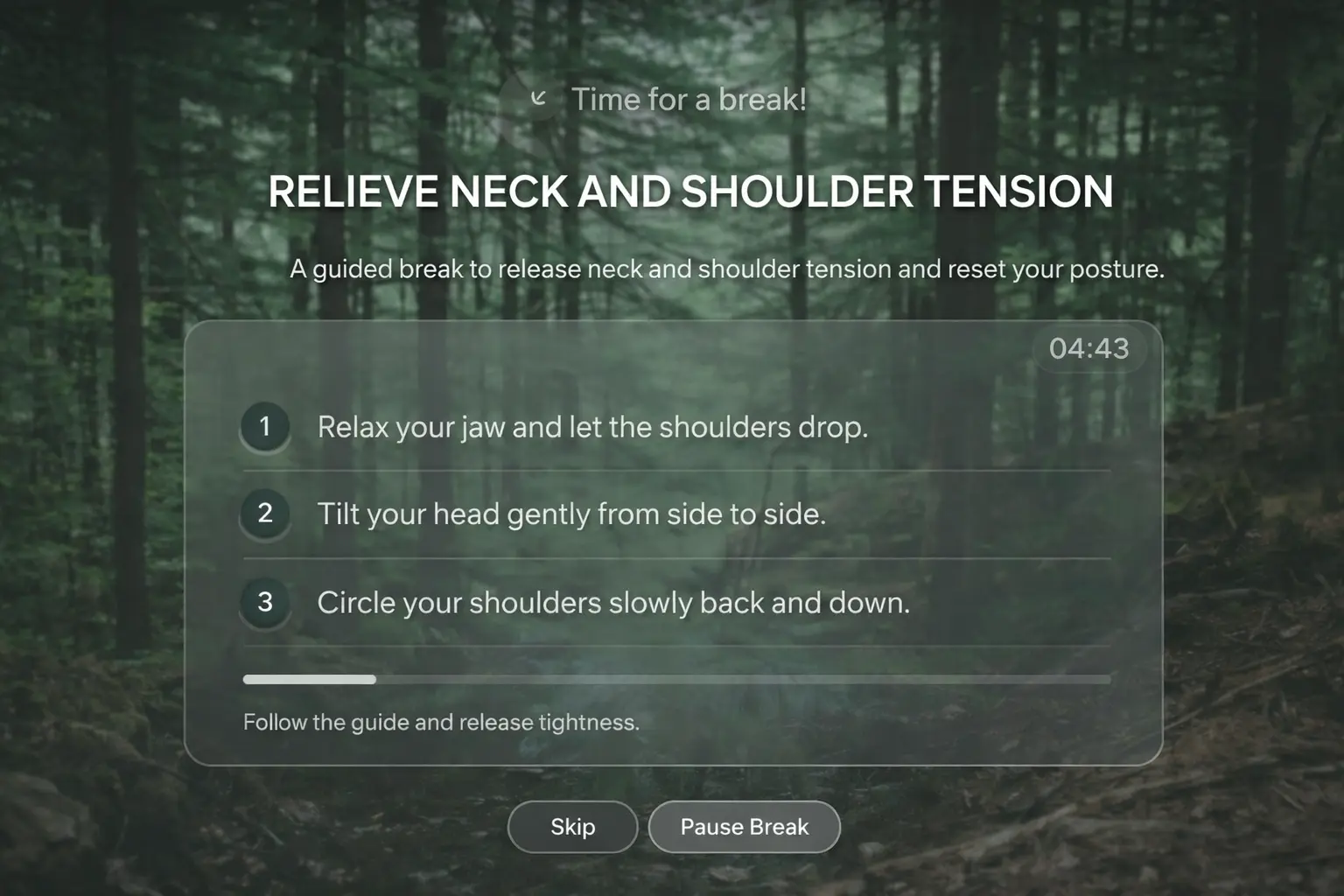
On full-screen breaks, Restier can now show a richer guided card instead of only a timer-based center panel. That card includes:
- a clear break theme;
- short step-by-step instructions;
- subtle progress feedback during the break;
- the ability to change suggestion if you want a different type of reset.
On light break mode, Restier keeps things intentionally compact. You get a teaser for the active suggestion plus the option to take the full break if you want the richer experience.
This keeps the lighter workflow intact while still making the new functionality visible.
The first guided break categories
The initial guided-break system focuses on the types of pauses that fit naturally inside a desk-work day:
1. Eye relief
Short cues inspired by visual-reset habits such as 20-20-20. These are designed to reduce the feeling of constant short-distance focus.
2. Posture resets
Simple prompts like opening the chest slightly, releasing the shoulders, or lengthening the front of the neck without becoming rigid.
3. Gentle movement
Micro-sequences for neck, shoulders, and upper back so you are not stuck in the same position all day.
4. Breathing
Brief, calm breathing patterns that work well when you need to lower tension quickly without overcomplicating the break.
Built to fit the break you actually have
Not every break should feel the same.
That is why guided content is selected according to break length:
- micro breaks can suggest faster resets;
- short breaks can guide one focused action;
- longer breaks can combine a few small steps into a more complete reset.
This matters because one of the easiest ways to kill a habit is to ask too much from it. A 60-second break should feel doable. A longer break can carry more depth.
Professional, not gimmicky
We wanted this to feel modern and calm, not like productivity gamification pasted on top of a wellness feature.
That meant a few deliberate choices:
- one main suggestion per break instead of a busy carousel;
- short copy with a clear purpose;
- a polished, glass-like visual treatment for full-screen breaks;
- support for both full-screen and less invasive notification-style breaks;
- preserving the break system already in place instead of rewriting it from scratch.
Under the hood, guided breaks sit on top of the existing break scheduler rather than replacing it, which helps keep the behavior stable across the rest of Restier.
Why this matters for desk workers
If you work long hours at a desk, the value of a break is not the alert itself. The value is what happens after the alert appears.
The difference between:
- “a timer told me to stop”, and
- “I actually released tension, rested my eyes, and came back better”
is exactly where guided breaks aim to help.
If your workday usually ends with a stiff neck, heavy shoulders, or tired eyes, this is the kind of feature that can make Restier feel substantially more useful.
Try guided breaks in Restier
Guided breaks are now part of the broader Restier experience across healthier desk-work habits, posture awareness, visual rest, and smarter reminder timing.
If you want the SEO-friendly, practical version of the problem this feature is trying to solve, read How to Reduce Neck and Back Pain While Working at a Desk.
And if you want to try the feature directly, download Restier and test guided breaks during your next work session.